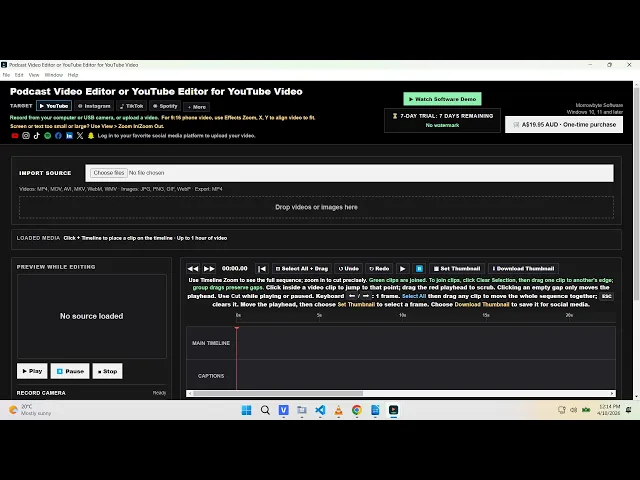

Useful tools without the learning curve. Make landscape and vertical videos with Podcast Video Editor And Youtube Editor For Youtube Video, Windows desktop software for Windows 10 and later. Your audio and video stay on your computer.
Lifetime license: A$19.95 AUD · One-time payment · Australian GST included · In-app checkout.
⚠ Only if you record from a camera or microphone: Windows 10 and 11 block desktop apps by default. Go to Settings → Privacy (or Privacy & security) → Microphone and Camera, turn on “Allow desktop apps to access”, then close and reopen Podcast Video Editor. Not needed if you only import video files.
Useful tools without the learning curve
Import or record
Import video and image files, or record from a connected camera and microphone.
Edit on a visual timeline
Arrange clips; cut, move, copy, paste, delete, undo and redo edits.
Preview and zoom
Preview while editing and zoom the timeline for detailed work.
Adjust your footage
Adjust brightness and contrast, and reposition or zoom a clip with pan-and-crop controls.
Make landscape and vertical videos
Choose 16:9 widescreen or 9:16 vertical output, or platform presets for YouTube, Instagram, TikTok, Spotify, Facebook, LinkedIn, X and Snapchat.
Add captions locally
Generate English auto-captions locally with Whisper, import an SRT subtitle file, burn subtitles into the MP4, or save a separate SRT file.
Save your projects
Save and reopen projects.
Export an MP4
Export the timeline as an MP4.
How it works
01 — Import or record your footage.
02 — Arrange clips, make edits, and add captions.
03 — Render an MP4 and upload it wherever you share your content.
Made for regular publishing
For podcasters, independent creators, educators, interviewers and small teams who need practical video editing for regular publishing.
Try it for 7 days
Try the software free for 7 days. The trial includes no watermark. After the trial, the lifetime license is A$19.95 AUD as a one-time payment, including Australian GST. In-app checkout. Any applicable taxes for other locations will be shown at checkout.
Frequently asked questions
Is this a browser-based editor?
Which Windows versions does it support?
Can I make vertical videos?
Can I add captions?
Does it upload videos to social media?
Is there a free trial?
Spend less time fighting your editor.
Bring your clips together, finish your edit, and get your next video ready to share.
Watch the Software Demo
Privacy statement
Your audio and video files stay on your computer. Read our Privacy Policy for details about purchases, support emails and third-party website services.